Network licence error -97,121 on startup. View of log file may show that licences have expired.
Check & correct date/time on machine.

Tuesday, 25 February 2020

Friday, 21 February 2020
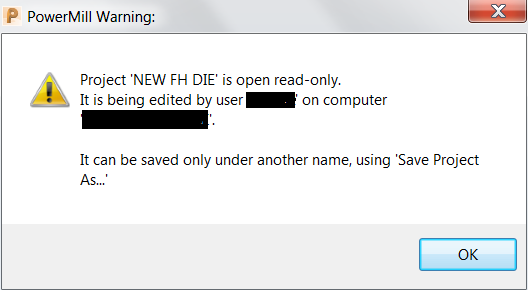
PowerMill opens a project read-only
PowerMill opens a project read-only and can only be saved using 'Saved Project As'.
This can happen if a project closes unexpectedly or if it is still open on another PC / server.
This can happen if a project closes unexpectedly or if it is still open on another PC / server.
Solution:
If saving under a different name is undesirable, confirm that the project is the only version open and then do the following:- Select the HOME tab.
- Open the command window by selecting ECHO COMMANDS.
- In the command window,type: project claim.
- Press ENTER followed by YES to claim the project .
- The user can now save their project.
Inventor hanging on startup
The first thing I try when Autodesk software such as Inventor hangs on startup, is to delete the temporary files in Windows:
1. Press the
Windows Button + R to open the "Run" dialog
box.
2. Enter
this text: %temp%
3. Click
"OK." This will open your temp folder.
4. Press
Ctrl + A to select all.
5. Press
"Delete" on your keyboard and click
"Yes" to confirm.
6. All
temporary files will now be deleted
Thursday, 20 February 2020
Check network license status from client pc
Install or copy LMTOOLS.EXE onto the client machine and launch it.
On the Service/License File tab, choose the radio button labeled Configuration using License File.
In the box, type 27000@servername where servername is the hostname of your server hosting the NLM.
Step 4: Then on the Server Status tab, click the Perform Status Enquiry button to get the current status.

On the Service/License File tab, choose the radio button labeled Configuration using License File.
In the box, type 27000@servername where servername is the hostname of your server hosting the NLM.

Step 4: Then on the Server Status tab, click the Perform Status Enquiry button to get the current status.
Subscribe to:
Comments (Atom)